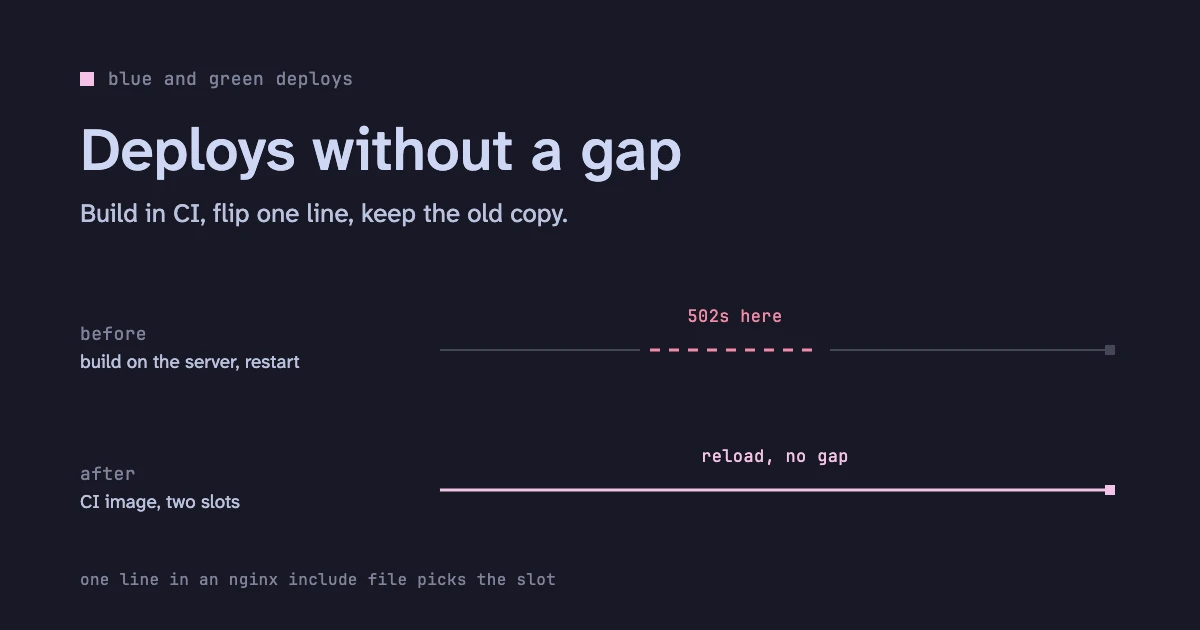
I look after a Next.js 16 app: marketing pages and a logged-in dashboard, on one Linux server behind nginx. It deployed with pm2, and every deploy dropped requests for a few minutes.
This post is the setup that replaced it, the bug it nearly shipped, and how I tested it. If you are choosing between pm2 and Docker for a Next.js app, the last sections compare the options.
How it deployed with pm2#
pm2 ran next start. A deploy was a person on the production server:
- SSH in.
git pullin a second copy of the repo, so the live folder stays untouched during the build.- Build there.
- Move the new
.nextfolder into the folder pm2 runs from. - Restart the process.
- Read
git logto remember which commit is now live.
Every step is a chance to get it wrong: pull the wrong branch, copy half a folder, restart the wrong process. That human gap was the real problem. The technical ones came with it:
- The build competes with production for CPU and memory.
- The restart is a gap. Requests that arrive during it get a 502.
- The old build is overwritten, so a rollback means doing all of it again on the old commit.
- Only the folder and someone’s memory say which commit is live.
Now a merge is the whole deploy. Nobody logs in.
How it deploys now#
CI builds a Next.js “standalone” Docker image and tags it with the git commit. Then CI tests that exact image before it goes anywhere:
- Its health endpoint returns its own commit.
- Pages and rewrites answer 200.
- No
.envfile is inside. - It runs as a non-root user.
- It listens on localhost only.
If all that passes, CI pushes the image to a registry.
On the server there are two slots, blue and green, each a container on its own local port. nginx sends every page request to an upstream, and the target of that upstream lives in a one-line include file:
upstream app { include /etc/nginx/upstream.inc; }
# upstream.inc holds one line:
server 127.0.0.1:3001;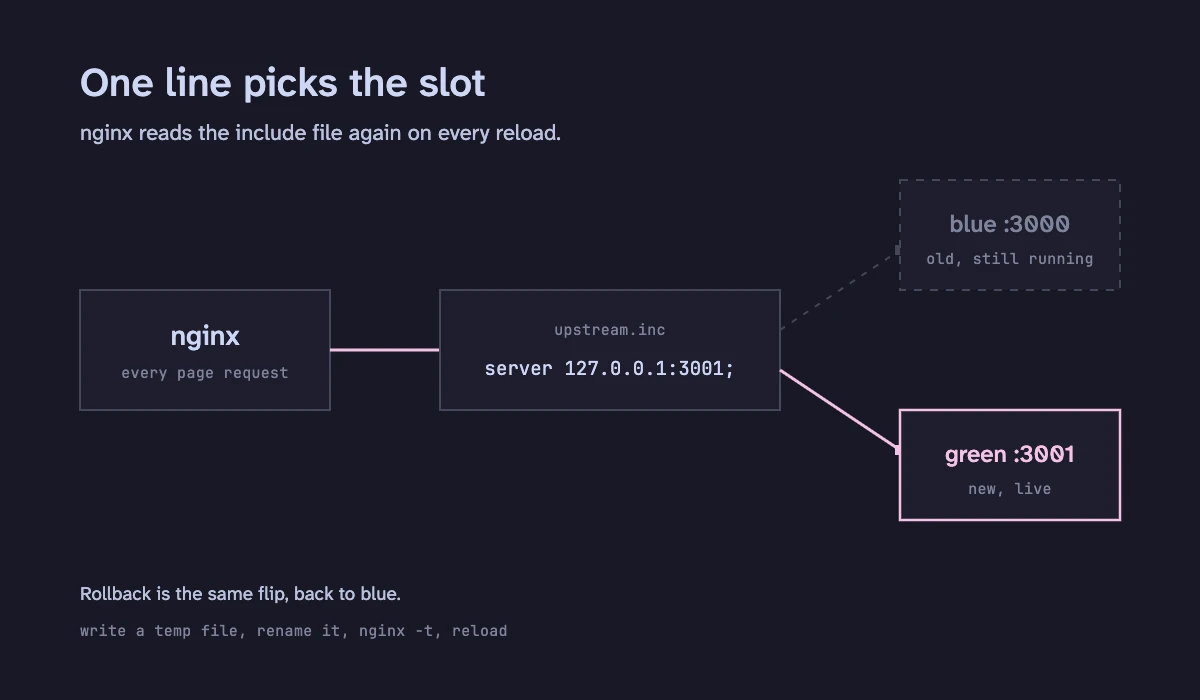
The deploy script does this:
- Start the new image on the idle slot.
- Wait for Docker’s health check, then for page checks. The page checks also warm the cache.
- Write the new include to a temp file, then rename it over the old one. The file is never half-written.
- Run
nginx -t, then reload nginx. - Watch the new slot for 30 seconds. After 3 failed checks, switch back by itself.
The old slot keeps running. So a rollback is the same flip in the other direction, and takes about two seconds.
Why a reload drops nothing#
The nginx master process owns the listening socket and never closes it. A reload starts new workers on the new config. The old workers finish every request they already hold, then exit. A new connection always finds an open socket.
The bug that nearly shipped#
In the image I set HOSTNAME=127.0.0.1, so Next would listen on localhost only. That looked like plain hardening.
Then every page that uses a middleware rewrite started returning 500. Other pages were fine.
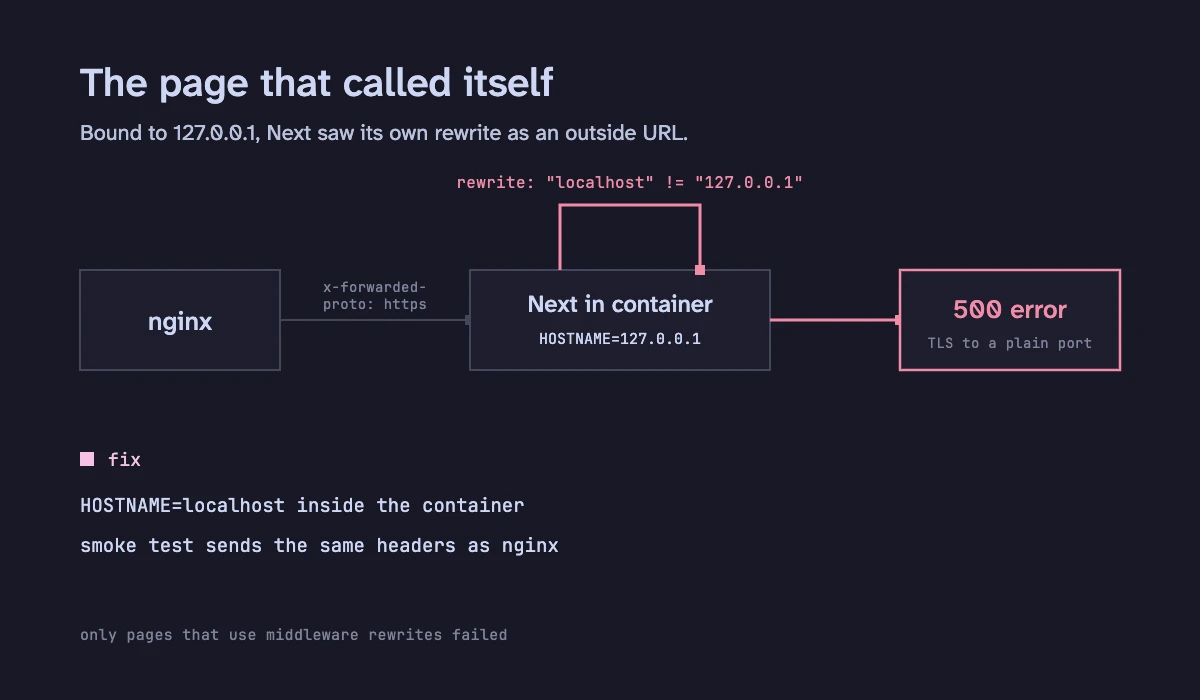
Here is what happens inside Next:
- For a rewrite, Next builds the target URL on the name “localhost” (
next-server.js:fetchHostname || 'localhost'). - The router builds its own URL from the name it listens on (
resolve-routes.jsbuildsinitUrlfromopts.hostname). That is127.0.0.1. - The two origins differ, so Next treats the rewrite as an external URL and proxies it to itself.
- Behind nginx the request carries
X-Forwarded-Proto: https. So the self-proxy goes over https to a port that only speaks plain http. - That fails with a TLS error. The user sees a 500.
pm2 never had this, because next start passes no hostname. My first smoke test also passed, because plain curl sends no proxy headers.
I fixed two things. The image now sets HOSTNAME=localhost. Inside a container that name resolves to 127.0.0.1 only, so it is still not reachable from outside. And the smoke test now sends the same Host and X-Forwarded-Proto headers that nginx sends.
A test that does not look like production will pass a bug that production hits.
How I proved it before switching#
- A route sweep. I listed every page and route handler from the build’s own manifests, filled in the dynamic segments, and added redirects and SEO files. Through nginx, the old app and the new image gave the same status, content type and redirect target for every one.
- A real browser. A headless browser loaded the main pages through a trial copy of nginx. Same status, same visible text, no failed requests.
- The runtime environment, by hash. I compared the environment of both by hash, so no value was ever printed. Every key matched.
The cutover#
I did it in two steps, each checked through the live nginx with an automatic undo:
- Point nginx’s page rules at the upstream, with the upstream still naming the old pm2 port. Users saw no change.
- Flip the upstream to the container.
The access log showed no server errors around the switch, and an outside check that ran once a second saw no failures.
The stress test#
I ran this on the real server, against a trial nginx with a copy of the live site config. It listened on localhost only, so production was never at risk.
- Two backends.
- About 145 to 150 requests a second.
- HTTP/1.1 keep-alive and HTTP/2, with a real certificate.
- 8 public pages.
- The upstream flipped every 4 seconds for 2 minutes, so 30 flips.
| Run 1 | Run 2 | |
|---|---|---|
| Requests | 17,484 | 17,884 |
| Failures a user would see | 0 | 0 |
| HTTP/2 streams refused mid-reload | 2 | 0 |
A refused stream (REFUSED_STREAM) means the server never processed the request, and browsers resend it silently. Each flip (write the include, nginx -t, reload) took at most 22 ms.
My first attempt reported 2,450 failures. That was my own mistake. One test path was an API route that nginx sends to a different backend, which answered 404. I fixed the path list and ran it again.
pm2 or Docker: which one fits#
pm2 has a zero-downtime reload in cluster mode: it restarts workers one at a time. That can close the restart gap. It does not fix the other three problems. The build still runs on the server, it still writes over the files the running app serves, and a rollback is still a rebuild.
| pm2, build on the server | Docker image, blue and green | |
|---|---|---|
| Who deploys | A person on the server: pull, build, copy, restart | A merge. Nobody logs in |
| Where the build runs | On the production server | In CI |
| What you test | The source | The exact image that will run |
| Deploy gap | A restart, or a rolling reload in cluster mode | None: nginx moves traffic after the new copy passes its checks |
| Rollback | Pull, build and copy the old commit again | Flip back to the copy still running |
| Which commit is live | Read the folder | The image tag |
| Moving parts | pm2 | Docker, a registry, a deploy script |
pm2 is still a fine pick for a small app where a few seconds of errors on deploy do not matter, or a server where you cannot run Docker. Once a failed deploy costs real users, the tested image and the instant rollback are worth the extra parts.
Is a file and a reload the right switch?#
It works, and the numbers above show it. But the deploy script owns the switch. Open-source nginx also has no active health checks. The docs list them as part of the commercial subscription. So nginx only learns that a backend is bad when a real request fails, and the script has to do the watching.
I checked what else exists, in each project’s own docs.
- What I run: nginx, an include file,
nginx -t, reload. The script rewrites a file and reloads nginx. Nothing new to run. The cost: the script owns the switch, and open-source nginx has no active health checks. - kamal-proxy.
kamal-proxy deploy <service> --target host:porthealth-checks the new target (a GET to/uponce a second by default), then routes new traffic to it and waits for the old one to drain. There is no config file to reload. The cost: one more process on every request, and the docs do not describe rollback. - Traefik. It reads routing from Docker container labels and watches Docker events. By default it follows each container’s Docker health check, so a new container with the right labels joins by itself. The cost: it needs the Docker socket, and the docs warn that unrestricted access can put the host at risk.
- Caddy.
reverse_proxyhas active health checks (every 30 s by default) and passive ones, without a paid tier. Routing by container label comes from a separate plugin,caddy-docker-proxy. The cost: the plugin is a custom build or its own image, and its README says images that track master have no stability guarantee. - docker-rollout. A Docker Compose plugin. It doubles a service, waits for the new container to be healthy, then removes the old ones. The cost: it needs a proxy that finds containers by itself, no fixed host ports and no
container_name, so fixed ports like mine do not fit. Draining needs extra setup.
Each one adds a moving part in front of every request. That is the real price, more than the lines of config.
What I would try next is kamal-proxy, put behind nginx. nginx keeps TLS and the other routes. The include file then points at kamal-proxy once and never changes again. The deploy script calls kamal-proxy deploy, and the proxy does the health check and the drain. I have not run it yet. Before I trust it I want to see how rollback works, and what one more hop does to latency.
Watching it afterwards#
A deploy you cannot see is a deploy you cannot trust. I added four checks:
- An outside probe of the main pages, so a dead site pages someone within a minute.
- An alert for a container that runs but fails its health check.
- An alert on a burst of page 5xx errors.
- A warning when a container nears its memory cap.
What this does not cover#
- It is one server. A server failure still takes the site down.
- Old browser tabs can ask for old JS chunks after a deploy. This is build skew, and two slots do not remove it.
- The stress test did not include logged-in pages. They take the same nginx path, but I did not measure them.
What I took away#
- A smoke test must send what production sends. Mine passed a bug because it had no proxy headers.
- Keep the old version running after a deploy. It makes a rollback one line.
- Check your test before you trust its failures. My 2,450 failures were a wrong path in my own list.